Talos Linux on Hetzner Bare Metal with Cilium – Part 4: Upgrades the GitOps Way
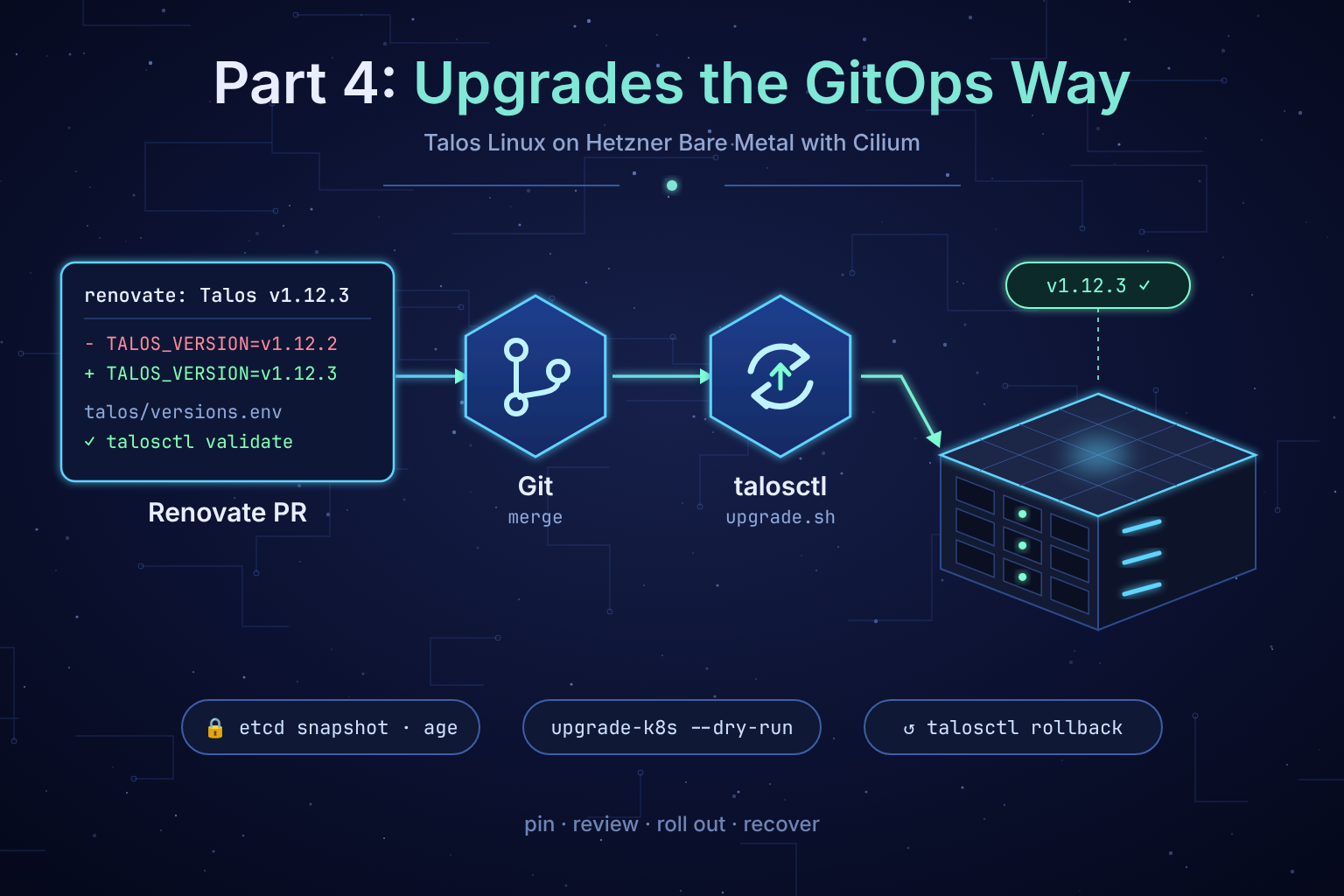
Pin Talos and Kubernetes versions in Git, let Renovate open the upgrade PRs, and roll them out with a small, repeatable script that takes an encrypted etcd snapshot before every reboot.
In Part 1 we brought up a single-node Talos cluster on Hetzner bare metal with Cilium. Part 2 handed the cluster over to FluxCD, and Part 3 moved every secret into Git, encrypted with SOPS and age.
The cluster is now one repository plus one key. But it’s a repository frozen in time: Talos v1.12.2, whatever Kubernetes version that release shipped with, and a set of pinned Helm charts. Without upgrades, every setup slowly turns into the kind of server nobody dares to touch.
This part makes upgrades boring:
- 👉 pinning Talos and Kubernetes versions in Git
- 👉 letting Renovate open the upgrade PRs, for Talos, Kubernetes, Helm charts, and Flux itself
- 👉 a small upgrade script with pre-flight checks and an encrypted etcd snapshot
- 👉 knowing what to do when it goes wrong
Two Kinds of Upgrades
Not everything in this stack is upgraded the same way, and it helps to be clear about that up front:
| Layer | Managed by | How an upgrade is applied |
|---|---|---|
| Helm charts (Cilium, cert-manager, …) | Flux | merge the PR, Flux reconciles |
| Flux itself | Flux | merge the PR, Flux reconciles |
| Talos OS | talosctl | merge the PR, then run the upgrade |
| Kubernetes (API server, kubelet, …) | talosctl | merge the PR, then run the upgrade |
The first two are pure GitOps: a commit is the upgrade. The last two live below Flux. Talos replaces the OS image and reboots the node, and the Kubernetes control plane runs as static pods that Talos manages from its machine config. Flux can’t do that for us.
What we can do is make Git the source of truth for the versions as well, and turn the actual rollout into one well-tested command.
Step 1: Pin the Versions in Git
In Part 1 the versions lived in shell variables on your laptop. Move them into the repo next to the Talos files from Part 3:
1
2
3
4
5
6
7
8
# talos/versions.env
# renovate: datasource=docker depName=ghcr.io/siderolabs/installer
TALOS_VERSION=v1.12.2
# renovate: datasource=docker depName=ghcr.io/siderolabs/kubelet
KUBERNETES_VERSION=v1.35.0

SCHEMATIC_ID=<SCHEMATIC_ID>
NODE=<NODE_PUBLIC_IP>
Use the Kubernetes version you’re actually running (kubectl version). If you followed Part 1 without pinning anything, it’s the default of the talosctl release you used to generate the config.
The installer image in talos/patch.yaml carries the Talos version too. Give it the same kind of comment so it doesn’t drift:
1
2
3
4
5
6
# talos/patch.yaml
machine:
  install:
    disk: /dev/nvme0n1
    # renovate: datasource=docker depName=ghcr.io/siderolabs/installer
    image: factory.talos.dev/metal-installer/<SCHEMATIC_ID>:v1.12.2
The # renovate: comments tell Renovate where to look for new versions. We don’t use the Image Factory as a datasource, because the schematic ID is specific to us. The plain ghcr.io/siderolabs/installer image is released at the same time, so its tags work as a version feed.
From now on, regenerate the config with the pinned Kubernetes version. Otherwise talosctl gen config quietly uses its own default, and the config in your head and the config on the node start to diverge:
1
2
3
4
5
6
7
source talos/versions.env
sops exec-file talos/secrets.yaml \
  "talosctl gen config my-cluster https://${NODE}:6443 \
     --with-secrets {} \
     --config-patch @talos/patch.yaml \
     --kubernetes-version ${KUBERNETES_VERSION#v} \
     --output-types controlplane,talosconfig"
Keep your local
talosctlat the same version asTALOS_VERSION. The client decides which defaults end up in a generated config, andupgrade-k8sfrom an older client can miss steps a newer Talos expects. A tool likemiseoraquacan pin the CLI version per repository.
Step 2: Let Renovate Watch Everything
Part 2 already recommended pinning chart versions and letting Renovate open the PRs. Here’s a renovate.json for the talos-k8s repository that covers all four layers from the table above:
1
2
3
4
5
6
7
8
9
10
11
12
13
14
15
16
17
18
19
20
21
22
23
24
25
26
27
28
29
30
31
32
33
34
35
{
  "$schema": "https://docs.renovatebot.com/renovate-schema.json",
  "extends": ["config:recommended"],
  "flux": {
    "managerFilePatterns": ["/\\.ya?ml$/"]
  },
  "customManagers": [
    {
      "customType": "regex",
      "description": "Talos and Kubernetes versions",
      "managerFilePatterns": ["/^talos/versions\\.env$/", "/^talos/patch\\.yaml$/"],
      "matchStrings": [
        "# renovate: datasource=(?<datasource>\\S+) depName=(?<depName>\\S+)\\n[A-Z_]+=(?<currentValue>v\\S+)",
        "# renovate: datasource=(?<datasource>\\S+) depName=(?<depName>\\S+)\\n\\s*image: \\S+:(?<currentValue>v\\S+)"
      ]
    }
  ],
  "packageRules": [
    {
      "matchDepNames": ["ghcr.io/siderolabs/installer"],
      "groupName": "Talos",
      "separateMinorPatch": true
    },
    {
      "matchDepNames": ["ghcr.io/siderolabs/kubelet"],
      "groupName": "Kubernetes",
      "separateMinorPatch": true
    },
    {
      "matchManagers": ["flux"],
      "matchUpdateTypes": ["patch"],
      "automerge": true
    }
  ]
}
What each part does:
flux.managerFilePatterns: by default Renovate’s Flux manager only looks atgotk-components.yaml, which keeps Flux itself up to date. Widening the pattern makes it read everyHelmReleaseand itsHelmRepositoryas well.customManagers: the two regexes match the# renovate:comments from Step 1. The first one handlesKEY=valuelines, the second one theimage:line in the patch.groupName: Talos: the version inversions.envand the image inpatch.yamlare always bumped in one PR, so they can’t get out of sync.separateMinorPatch: patch releases and minor releases get separate PRs. You want to takev1.12.3without thinking, butv1.13.0deserves a look at the release notes.automergefor Flux patch updates: chart patch releases go in automatically. Flux reconciles them, and if something breaks, the revert is one commit. Everything else waits for you.
Don’t automerge Talos or Kubernetes. Those PRs don’t change the cluster by themselves, because someone still has to run the upgrade. An automerged version bump that was never applied just makes Git lie about what’s running.
Step 3: Review the PR Like an Upgrade
A Renovate PR for Talos or Kubernetes is a two-line diff, but merging it is a promise that you’ll run the upgrade soon. Before you merge, check a few things the diff can’t show:
- One minor at a time. Go from
v1.12.xtov1.13.x, not straight tov1.14. The same applies to Kubernetes, where version skew rules make skipping minors unsupported. WithseparateMinorPatchRenovate already offers the steps one by one. - Talos ↔ Kubernetes support matrix. Every Talos release supports a range of Kubernetes versions. Upgrade Talos first, then Kubernetes, so the new Kubernetes always lands on a Talos version that knows it.
- Cilium ↔ Kubernetes. Before a Kubernetes minor bump, check that your Cilium version lists it as supported. If not, take the Cilium PR first, and remember the Gateway API CRD version from Part 1.
- Release notes. Look for removed APIs, changed defaults in the machine config, and extensions that were renamed or dropped. Your schematic from Part 1 has to still make sense for the new version.
A small CI check catches typos in the patch before they reach the node. talosctl can generate a config with throwaway secrets and validate it:
1
2
3
4
5
6
7
8
9
10
11
12
13
14
15
16
17
18
19
20
21
22
23
24
# .github/workflows/talos-validate.yaml
name: Validate Talos config
on:
  pull_request:
    paths: ["talos/**"]
jobs:
  validate:
    runs-on: ubuntu-latest
    steps:
      - uses: actions/checkout@v6
      - name: Install talosctl
        run: |
          source talos/versions.env
          curl -sL -o /usr/local/bin/talosctl \
            "https://github.com/siderolabs/talos/releases/download/${TALOS_VERSION}/talosctl-linux-amd64"
          chmod +x /usr/local/bin/talosctl
      - name: Generate and validate
        run: |
          source talos/versions.env
          talosctl gen config ci https://127.0.0.1:6443 \
            --config-patch @talos/patch.yaml \
            --kubernetes-version "${KUBERNETES_VERSION#v}" \
            --output-types controlplane
          talosctl validate --config controlplane.yaml --mode metal
The secrets in CI are freshly generated and thrown away with the runner, so the real secrets.yaml and your age key never leave your machine.
Step 4: One Script for Upgrade Day
The rollout itself should be a single command that does the same thing every time. Here’s the script I use. It reads the versions from Git, checks the cluster is healthy, takes a backup, upgrades, and checks again:
1
2
3
4
5
6
7
8
9
10
11
12
13
14
15
16
17
18
19
20
21
22
23
24
25
26
27
28
29
30
31
32
33
34
35
36
37
38
39
40
41
#!/usr/bin/env bash
# talos/upgrade.sh
set -euo pipefail
cd "$(dirname "$0")/.."
source talos/versions.env

export TALOSCONFIG=${TALOSCONFIG:-$PWD/talosconfig}
IMAGE="factory.talos.dev/metal-installer/${SCHEMATIC_ID}:${TALOS_VERSION}"
AGE_RECIPIENT=$(grep -o 'age1[0-9a-z]*' .sops.yaml | head -n1)

step() { printf '\n\033[1m==> %s\033[0m\n' "$*"; }

step "Pre-flight: working tree and cluster health"
git diff --quiet || { echo "Uncommitted changes, aborting."; exit 1; }
talosctl -n "$NODE" health --wait-timeout 2m
kubectl -n flux-system wait kustomizations.kustomize.toolkit.fluxcd.io --all \
  --for=condition=Ready --timeout=2m

step "Backup: encrypted etcd snapshot"
mkdir -p backups
snap="backups/etcd-$(date +%Y%m%d-%H%M%S).snapshot"
talosctl -n "$NODE" etcd snapshot "$snap"
age -r "$AGE_RECIPIENT" -o "$snap.age" "$snap" && rm "$snap"
echo "Saved $snap.age"

step "Talos: upgrading to ${TALOS_VERSION}"
talosctl -n "$NODE" version
talosctl -n "$NODE" upgrade --image "$IMAGE"
talosctl -n "$NODE" health --wait-timeout 10m

step "Kubernetes: upgrading to ${KUBERNETES_VERSION}"
talosctl -n "$NODE" upgrade-k8s --to "${KUBERNETES_VERSION#v}" --dry-run
read -rp "Dry run looks good? Continue [y/N] " ok
[[ $ok == y ]] || exit 1
talosctl -n "$NODE" upgrade-k8s --to "${KUBERNETES_VERSION#v}"

step "Post-flight"
talosctl -n "$NODE" health --wait-timeout 5m
cilium status --wait
flux reconcile kustomization flux-system --with-source
kubectl get pods -A --field-selector=status.phase!=Running,status.phase!=Succeeded
A few notes on why it looks like this:
- Both steps are safe to rerun.
upgrade-k8sskips components that are already current. The Talos step reinstalls the same version if nothing changed, which costs an extra reboot but nothing else. So after a PR that only bumped Kubernetes, you can comment out the Talos step or just accept the reboot. - The etcd snapshot is encrypted with the same age key from Part 3, read from
.sops.yaml. An etcd snapshot contains every KubernetesSecretin plain text, so it must never sit around unencrypted. Addbackups/to.gitignoreand copy the.agefiles somewhere off the server. upgrade-k8s --dry-runshows exactly which component images and manifests will change. It’s the one moment in the script where reading the output is worth a pause.- The final
kubectl get podslists everything that isn’tRunningorCompleted. On a healthy cluster it prints nothing but the header.
On a single node, a Talos upgrade means downtime. The node reboots into the new image, and every workload is gone for those few minutes. Pick a time when that’s fine, and don’t run the script in a hurry.
The workflow on upgrade day is now:
- Renovate opens the PR, CI validates the config.
- You read the release notes, then merge.
git pull && ./talos/upgrade.sh
Why Not an In-Cluster Upgrade Controller?
There are controllers that watch a version in Git and run the Talos upgrade from inside the cluster, either as Talos-specific operators or as plans for the system-upgrade-controller. On a multi-node cluster they’re great: they drain one node at a time while the others keep serving.
On a single node, the controller sits on the machine it’s rebooting. If the upgrade fails halfway, there’s no other node to report back from, and nobody is watching. For this setup I’d rather be at the keyboard with the dry-run output in front of me. If you add nodes later, that’s the moment to revisit this.
When It Goes Wrong
The point of the backup and the checks is that a failed upgrade is an inconvenience, not a disaster.
Talos doesn’t come back healthy. Talos uses an A/B boot scheme: the previous version stays on disk as a fallback. If the new version boots but misbehaves, switch back:
1
talosctl -n <NODE_PUBLIC_IP> rollback
Then revert the Renovate commit, so Git matches what’s running again, and figure out what went wrong in peace.
Kubernetes is broken after upgrade-k8s. There’s no supported downgrade for a Kubernetes minor version. This is what the snapshot is for. Restore etcd as part of a fresh bootstrap, with your old Kubernetes version pinned in versions.env:
1
2
3
4
5
6
7
8
age -d -i ~/.config/sops/age/keys.txt \
  -o db.snapshot backups/etcd-<TIMESTAMP>.snapshot.age

talosctl -n <NODE_PUBLIC_IP> reset --graceful=false --reboot \
  --system-labels-to-wipe STATE --system-labels-to-wipe EPHEMERAL
# apply the config again (Part 1, Step 6), then instead of a plain bootstrap:
talosctl -n <NODE_PUBLIC_IP> bootstrap --recover-from=./db.snapshot
rm db.snapshot
Because the Talos secrets come from the same encrypted secrets.yaml, the restored cluster keeps its CA, and your talosconfig and kubeconfig keep working.
A Helm chart upgrade broke something. That’s the easy one: git revert the Renovate commit and push. Flux rolls the HelmRelease back to the previous version.
Test the restore once, before you need it. A backup you’ve never restored is a hope, not a backup. A cheap Hetzner Cloud VM running Talos is enough to try
--recover-fromwith a real snapshot.
Final Thoughts
Upgrades are where most “set it up once” clusters quietly die. Not because upgrading is hard, but because it’s never clear what’s running, what’s next, and what happens if it fails.
With this part, each of those questions has an answer in the repository:
- what’s running:
talos/versions.envand the pinned charts - what’s next: the open Renovate PRs
- how to roll it out:
talos/upgrade.sh - what if it fails: an encrypted etcd snapshot and a rollback that’s one command away
The stack from this series is still the same: Talos, Cilium, Flux, SOPS. It just doesn’t get old anymore.
Happy upgrading 🔄